

<details class="spl-mobile-toc">
  <summary class="spl-mobile-toc__summary">On this page</summary>
  <nav class="spl-mobile-toc__nav">
    <ul class="spl-mobile-toc__list">
      <li class="spl-mobile-toc__item"><a href="#overview" class="spl-mobile-toc__link">Overview</a></li>
      <li class="spl-mobile-toc__item"><a href="#bidding-process" class="spl-mobile-toc__link">Bidding Process</a></li>
      <li class="spl-mobile-toc__item"><a href="#setup-monitoring" class="spl-mobile-toc__link">Setup & Monitoring</a></li>
    </ul>
  </nav>
</details>
Overview
Move your company listing to the top of IAMX search results.
IAMX hosts over 100,000 location-based searches annually. Data analytics clearly show that top listings in IAMX search results get the most traffic — more email clicks, more website clicks, and more company profile clicks. Being the top listing helps a company gain greater attention and generate more business. View the traffic data analytics for your location and company at IAMX Data Analytics.
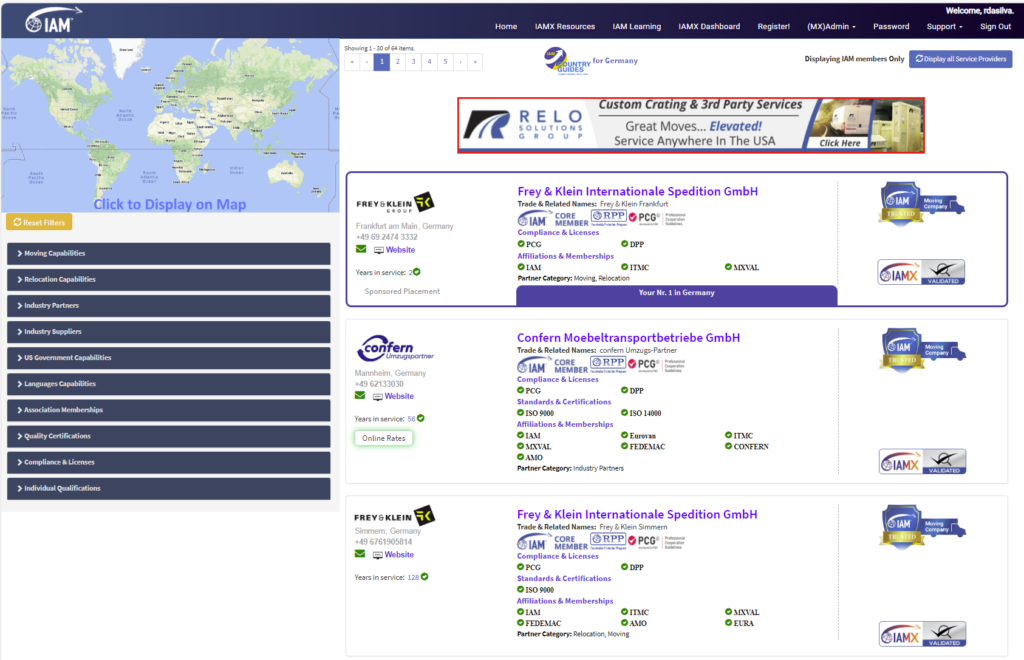
The IAMX Sponsored Placement Program allows you to move your company listing to the top of IAMX search results pages. Here is how it works:
- A company must be an IAM Member and IAMX-Validated to participate.
- Service Providers may only move their listing within the Country, State, or City of their IAM Membership. For example, an IAM Member in Spain cannot have a Sponsored Placement in France, but an IAM Member in Barcelona can have a Sponsored Placement in any search for a Spain location.
- IAM Supplier Members may have a Sponsored Placement in any search result. An insurance company offering services worldwide, for example, can display their Sponsored Placement in any search worldwide, or fine-tune their placement by including or excluding specific locations.
- Sponsored Placements may include one Tag Line of 70 characters or less, which will display in a blue bar at the bottom of the company listing. This is the only allowed addition to the normal company listing.
- As only one listing can hold the top position, only one Sponsored Placement is allowed per search results page. The listing sequence below the Sponsored Placement will remain as-is.
Bidding Process
How the IAMX algorithm determines Sponsored Placement priority.
Sponsored Placement Settings
IAMX uses algorithms that determine when a Sponsored Placement is used and displayed.
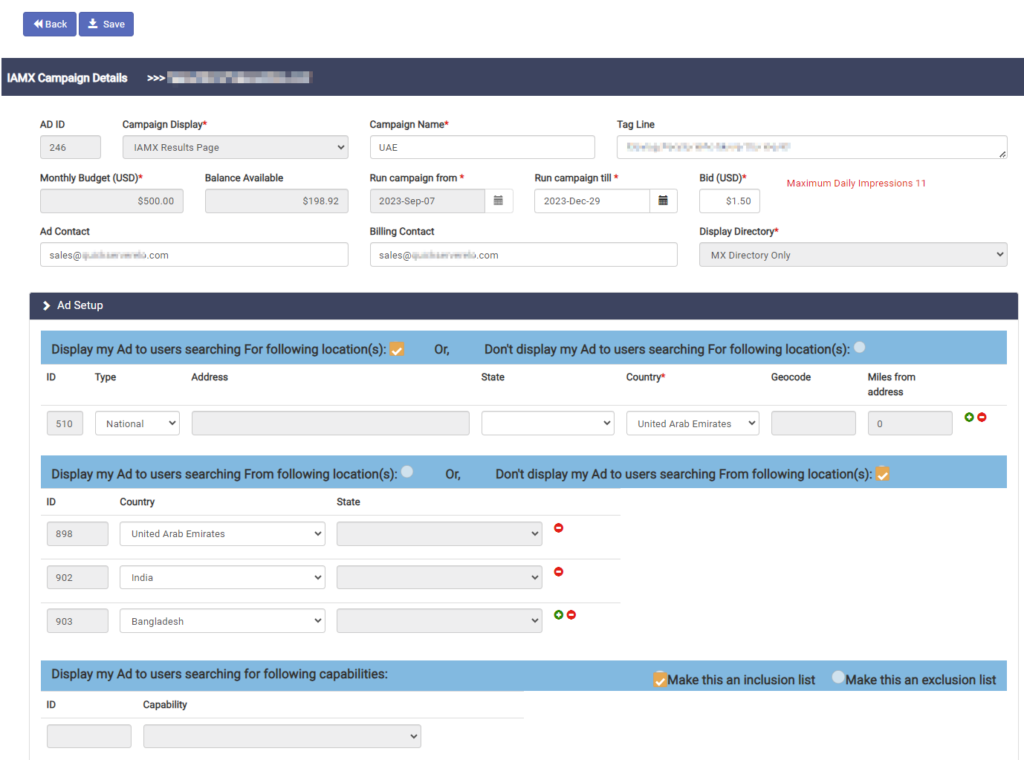
Important terms and information:
- Monthly Budget: the maximum billable amount for placements during a month.
- Daily Budget: monthly budget amount divided by 30.4. (Example: a monthly budget of $200 equals a daily budget of $6.58.)
- Bid Amount: the amount the sponsor can bid for each placement. (Minimum bid is US$0.50.)
- Searching FOR and Searching FROM — how to best target placements in both categories:
-
Searching FOR: The display ad to users searching FOR a location can be set to either an inclusion or exclusion list.
- Use an inclusion list if you want to target specific searched-for locations. For example, a moving company in Paris may set an inclusion for just Paris, France — or select all of France. A packing material supplier in Miami servicing Florida, Georgia, and North Carolina could include all three states.
- Use an exclusion list if you want to cover searches for most locations but exclude specific ones.
-
If no values are entered, the system will display the Sponsored Placement for all searched-for locations.
-
Searching FROM: The display ad can be set to show only for users searching from certain locations.
- Set an inclusion list to target only users searching from specific locations.
- Set an exclusion list to target users everywhere except specified locations.
- IP Addresses: You may exclude specific IP addresses. Certain IP addresses have been automatically excluded so that searches made by IAM or IAMX staff are not charged to your account.
-
Searching FOR: The display ad to users searching FOR a location can be set to either an inclusion or exclusion list.
Sponsored Placement Algorithm
The IAMX Sponsored Placement system determines:
- Which companies meet the inclusions and exclusions for the location of the user doing the search.
- Which companies meet the inclusions and exclusions for the location being searched for.
- Which companies have a positive monthly budget balance.
- Which companies have a positive daily budget balance.
- Which company is the highest bidder (in case of multiple bids) and gives it the top placement.
- Which company has the highest daily balance available (in case of equal bids) and gives it the top placement.
Setup & Monitoring
How to create your Sponsored Placement and track its performance.
Setting Up a Sponsored Placement
- Sign in to IAM Mobility Exchange.
- Reset your password if you have forgotten it: Password Reset.
- Click Admin.
- Select IAMX Ads.
- Select Setup Billing.
- Enter your credit card details. This will charge a one-time Ad Setup Fee of $50. This card will be charged monthly for your Sponsored Placement Program fees.
Monitoring Your Sponsored Placements
Detailed reporting on IAMX traffic is available at IAMX Data Analytics.
After the end of each month, you can download your invoice and Excel reports showing the time, user city, user country, and IP address of each impression. Sign in to IAMX, click IAMX Ads under the Admin menu, select your campaign, and you will see options to download Activity Reports and manage your account.
